
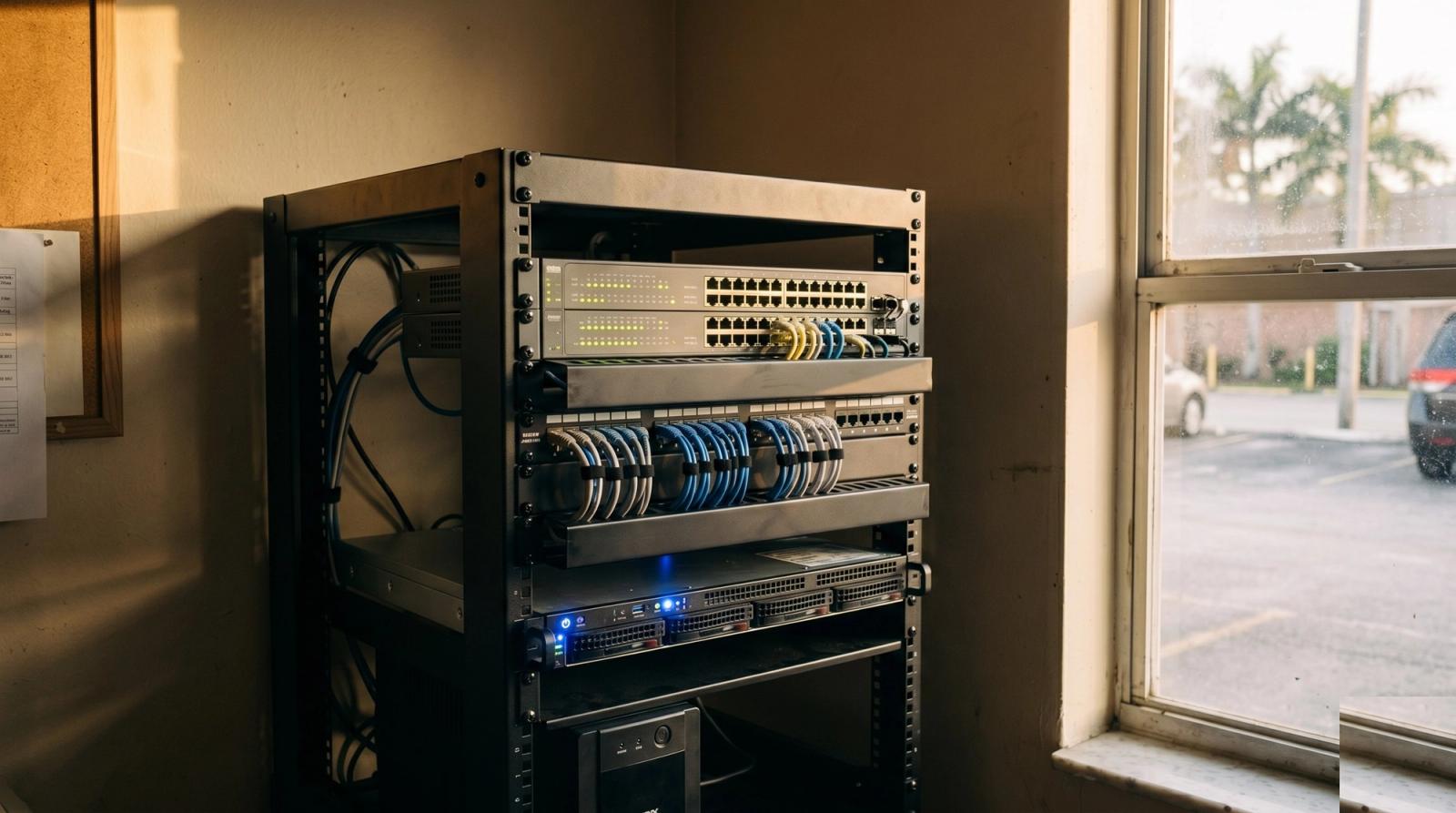
Walk into the back office of most small businesses around Orlando and you find the same thing: a consumer router balanced on a filing cabinet, a five port switch velcroed to the wall, and a bundle of cables running behind a shelf that nobody has traced in four years. It works, mostly, until the day it does not. We get those calls from Winter Park salons, Ocoee auto shops, Sanford clinics, and Altamonte Springs law offices, and the symptom is almost always the same. The internet is fine, but the business is down.
A network rack is not a status symbol and it is not overkill for a ten person office. It is the difference between a technician spending twenty minutes on a problem and spending half a day untangling guesswork. Here is what actually goes in one, why each piece earns its space, and what it costs to do properly the first time.
The Five Things Every Small Business Rack Needs
Strip away the enterprise catalog and a working small business rack comes down to five components:
- A patch panel. Every wall jack in the building terminates here, labeled. This single piece turns "which cable goes to the front desk?" into a two second answer.
- A managed switch. Consumer switches just move traffic. A managed switch lets you separate guest Wi-Fi from your point of sale, prioritize voice calls, and see which port is flapping.
- A real firewall or gateway. Not the box the ISP handed you. Something that logs, updates, and supports a VPN when the owner needs files from home.
- Power protection. A rack mount battery backup, sized to carry the network and the register through a Central Florida afternoon storm.
- Somewhere to put the server or NAS. Even if today that means one small box holding shared files and nightly backups.
Why the Router Under the Counter Keeps Failing
Consumer routers are built for a house with a dozen devices and a family that reboots the thing when Netflix stutters. A busy Doctor Phillips restaurant might have two registers, a kitchen display, a card reader, six staff phones, a camera system, and forty guest devices hitting that same little box at 7pm on a Friday. It does not crash because it is defective. It crashes because it ran out of room.
There is a heat problem too. That router sits under a counter with no airflow, in a building where the back office runs warm nine months of the year. We have pulled units out of Apopka and Winter Garden storerooms that were too hot to hold. Warm electronics get flaky long before they die outright, which is why the failures look random instead of obvious.
Cable Management Is Not About Looking Neat
Owners sometimes see a tidy rack and assume they paid for aesthetics. What they actually paid for is time. When a jack in the back office goes dead, a labeled patch panel and dressed cables mean the fix is a five minute swap. Without them, someone is on a ladder in the ceiling with a tone generator while your staff stands around.
Loose cable bundles also fail in ordinary ways. Cables get pinched behind furniture, stepped on, or yanked when someone moves a desk. A cable run that is anchored and terminated properly does not care that the office rearranged itself over the weekend.
Power Is the Part Florida Businesses Skip
Central Florida gives you two power problems. The first is the summer storm that drops service for ninety seconds. The second is the flicker, the brownout that never registers as an outage but reboots half your equipment anyway. Both are routine here, and both are why a battery backup lives at the bottom of a proper rack.
A correctly sized unit does three jobs. It rides out short interruptions so nothing reboots. It conditions dirty power so your switch is not absorbing every sag on the line. And it gives a server a clean shutdown instead of a hard one, which is how databases stay intact. For most small offices this is a few hundred dollars of equipment protecting several thousand dollars of gear and an unknown amount of lost revenue.
What a Right Sized Setup Actually Costs
For a typical Orlando office or storefront with ten to twenty five devices, here is roughly how the build breaks down:
- Wall mount rack and mounting hardware, the frame everything else hangs on.
- Patch panel plus keystone terminations for each existing wall jack.
- A 24 port managed switch, ideally with power over Ethernet so cameras and access points do not need their own outlets.
- A business gateway or firewall to replace the ISP box, keeping the ISP unit in bridge mode.
- Rack mount battery backup sized to your actual load, not the number on the box.
- Labor for termination, labeling, configuration, and documentation you can hand to any technician later.
Most builds at that size land in the low four figures installed, and the documentation matters more than owners expect. A rack with a printed port map is a rack anyone can service. A rack with no labels is a rack that costs you an hour of discovery on every future visit.
Signs Your Current Setup Is Already Costing You
- Somebody on staff knows which power strip to unplug to fix things. That is not a workaround, that is an outage waiting for the day that person is off.
- Guests and staff are on the same Wi-Fi network as the register.
- Nobody can say what is plugged into which port without tracing a cable by hand.
- Equipment reboots after storms, and you find out from an employee rather than an alert.
- You have added devices steadily for three years without ever revisiting the network they run on.
Start Where You Are, Not With a Full Rebuild
Very few businesses need everything at once. A Maitland office we worked with started with a small wall rack, a patch panel, and a switch, then added the battery backup the following quarter and a proper gateway after that. Each step stood on its own, and none of it had to be redone. The order that usually makes sense is structure first (rack and patch panel), then the switch, then power protection, then the gateway.
What you want to avoid is the pattern where every new device gets its own little box and its own adapter until the closet is a fire hazard nobody understands. Growth is fine. Growth without a plan is what turns a slow afternoon into a closed register.
The rack is not for the technician. It is so that on your worst day, the fix takes ten minutes instead of an afternoon.
If your back office looks more like a cable nest than a rack, we can walk it with you and tell you honestly what needs to change now and what can wait a year. We handle network builds, cleanups, and business support across Orlando, Winter Park, Lake Mary, Oviedo, and the surrounding area. Get in touch with Tech Forge Computers and we will start with a look at what you already have.